
Record. Read along. Find it again.
Three tabs carry the work. Behind them sit the mode presets, the clean-up tools, transcripts and a locked vault for anything you would rather nobody opened.
Record
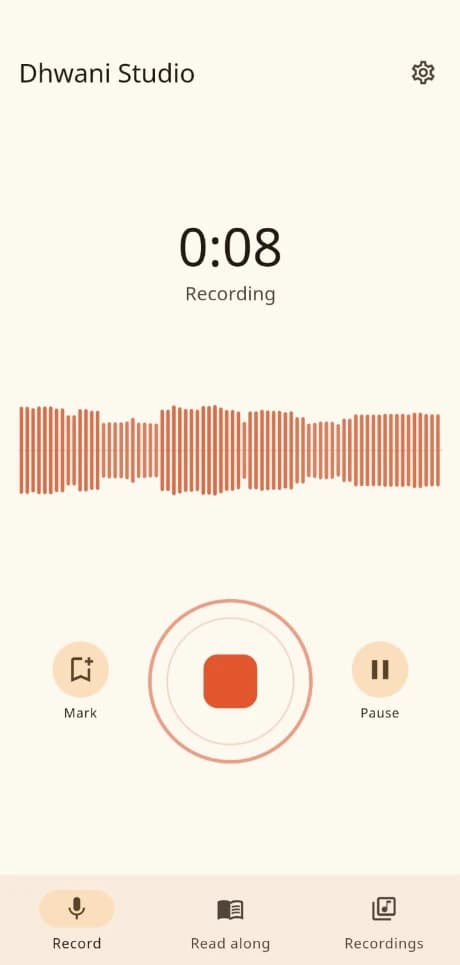
Made for the recording that runs long
A voice memo app is built for thirty seconds. This one assumes an hour and a half: it keeps recording with the screen off, tells you which happened when a call or an unplugged headset interrupts it, and stops safely before the phone runs out of space rather than truncating what you have. If it is ever closed mid-recording, the next launch hands back what was already captured.
- Mark a moment as it happens, then jump straight back to it
- Records with the screen off, through a notification
- Recovers the recording if the app closes mid-session
Read along
A teleprompter for the times you are the one speaking
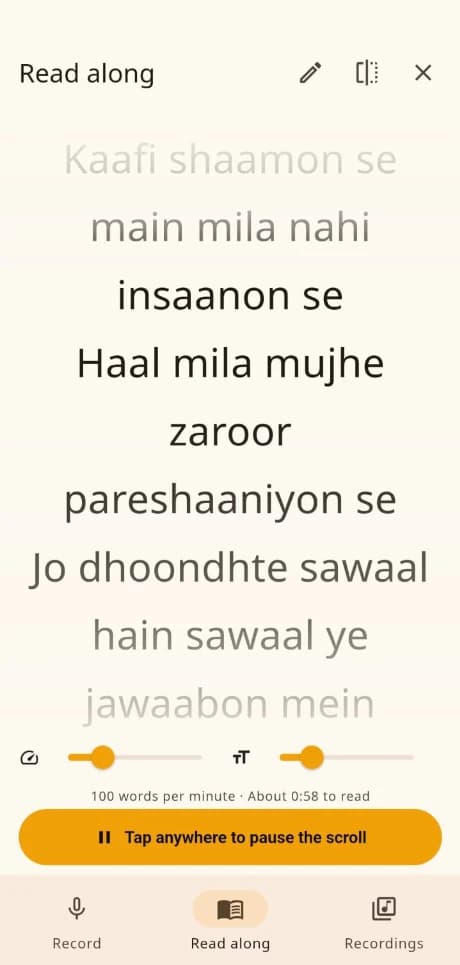
Import a PDF or paste the text, and the script scrolls while you record. Set it between 60 and 220 words a minute and the estimated reading time updates as you go; mirror mode flips it for teleprompter glass, and a tap anywhere stops the scroll when you need a moment. If the PDF uses an older Hindi font that extracts as nonsense, it says so rather than scrolling gibberish past you.
- 60 to 220 words a minute, with the read time shown
- Mirror mode for teleprompter glass
- Warns you when a PDF has not extracted cleanly
Recordings
Everything you have recorded, searchable
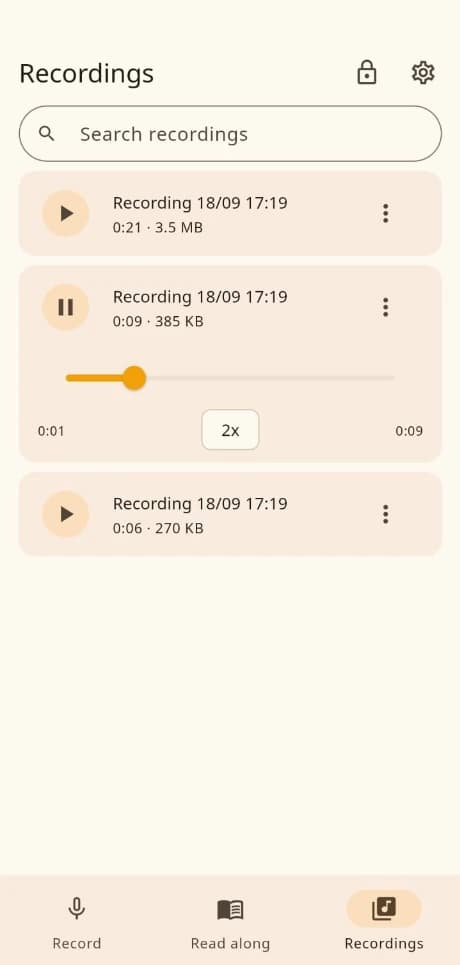
Search, rename and tag the library, then play anything back between 0.75× and 2× without leaving the list. The marks you dropped while recording become a list you can move through. Transcripts and clean-up start from here too — and a recording marked private sits behind your phone's own fingerprint or face unlock.
- Playback from 0.75× to 2×, and your marks as jump points
- Search, rename and tag across the whole library
- A private vault behind the phone's biometric lock
What are you recording?
Seven presets, picked before you press record
The mode sets the codec, decides whether noise suppression runs, and decides whether a long pause drops a mark by itself — a pause in a meeting is the next agenda item, a pause in a bhajan is part of the music. One engine underneath, different assumptions on top.
Quick note
A short note, saved straight away.
Meeting
Marks long pauses so you can jump back to each topic.
Interview
Higher quality, for something you may publish.
Lecture
Built for long classes, with automatic topic marks.
Music or bhajan
Stereo, and noise reduction is turned off so notes are not damaged.
Voice-over
Opens with your script, and suggests studio clean-up afterwards.
Dictation
Clear speech, tuned for reading back later.
Why it stays on the phone
There is no server to upload to
Not a setting you can switch off, and not a promise about how your files are handled: the app has no backend at all. Nothing to breach, nothing to hand over, and nothing that stops working when a subscription lapses.
Encrypted before it is written
Audio is encrypted with AES-256-GCM on the way to storage, so no plaintext recording is ever on disk. The key is generated on the device and held in the Android Keystore or the iOS Keychain.
No account, no identifier
There is no sign-up screen, no email address and no device identifier. Nothing about you is collected, because there is nowhere to collect it to.
No analytics, no ads, no trackers
The app carries no analytics SDK, no crash reporting, no advertising and no attribution library of any kind.
One network call, and only if you ask
The app reaches the internet in exactly one case: downloading the speech model for on-device transcription, if you choose to use it. Nothing of yours is sent with it.
Afterwards
Studio clean-up, done on the phone
Four tools, each one a suggestion you choose rather than something applied behind your back. The result saves as a new recording, so the original survives whatever you try on it. None of them are offered for a music recording, where noise reduction would damage sustained notes.
Reduce background noise
Removes steady sounds like fans and traffic. Works less well on sudden noises.
Reduce breath sounds
Softens breaths between sentences. Kept deliberately cautious so it never touches your s and f sounds.
Match standard loudness
Sets the volume to the level used by podcasts, so it plays as loudly as other recordings people receive.
Add background music
Plays quietly under your voice and steps back automatically while you speak.
Transcription
The speech model runs on the phone
Download the 142 MB model once and transcription works offline from then on. Audio is never uploaded for processing — not while recording, not while transcribing. Search the transcript, correct a line that came out wrong, and export it as a text file or a PDF.
Worth knowing before you rely on it
- Hindi transcription is rough. English transcription is genuinely usable. Hindi is not there yet — it will help you find your place in a long recording, not hand you a clean transcript. The app says so before you start.
- Transcription needs 6 GB of RAM. Below that the feature is hidden rather than offered and then running out of memory halfway through an hour of audio.
- A scanned PDF has no text to read. Read along extracts the words from a PDF. A photograph of a page has none to extract, and it tells you so instead of scrolling nonsense past you.
The numbers
- Recording quality
- Voice 32 kbps mono, about 13 MB an hour · Good 64 kbps mono, about 27 · Music 128 kbps stereo, about 54
- Export
- M4A (AAC), the format stock Indian phone players and WhatsApp handle natively
- Playback speed
- 0.75×, 1×, 1.25×, 1.5×, 2×
- Read along
- 60 to 220 words a minute, starting at 100
- Encryption
- AES-256-GCM, key held in the device's own key store
- Transcription
- On the device. One-time 142 MB model download, and 6 GB of RAM or more
- Languages
- English and हिन्दी, both bundled — no font or text is fetched
- Android
- 7.0 and later. About 15.8 MB to download on a 64-bit phone
- Price
- Free. No advertisements, no in-app purchases, no subscription
Getting a copy
Dhwani Studio is free, with no advertisements and no in-app purchases. It has not been submitted to Google Play or the App Store yet — tell us and we will let you know the day it lands, or talk to us about building on it for your own organisation.
Questions
Is anything uploaded?
No. Recordings, transcripts and metadata stay on the device. The single outbound request is the optional transcription-model download, which sends no content of yours.
How is the audio encrypted?
AES-256-GCM, applied before the file is written to the app's private storage. The key is held in the device's secure key store and never leaves the phone.
Does transcription work offline?
Yes, once the speech model has been downloaded the one time. It then runs on the phone itself. English is the stronger of the two languages — the Hindi model is much rougher, and the app tells you so before you use it.
Can I record with the screen off?
Yes. Recording continues in the background with a notification showing, which is what a ninety-minute lecture needs. If a call takes the microphone, the app tells you what happened rather than failing silently.
What happens if the app closes mid-recording?
Whatever had been captured is saved. The next time you open the app it recovers the interrupted recording instead of discarding it.
How do I delete a recording?
Delete it from the menu beside it in the library. Uninstalling the app erases every recording, its details, your settings and the downloaded model.
Does it cost anything?
No. There are no advertisements, in-app purchases or subscriptions.
Can I get it from the Play Store?
Not yet — it has not been submitted. Get in touch if you would like to know when it is.